CLI
# Zero-install — npx (umbrella package, single tarball)npx thai-qr-payment 0812345678 --amount 50 -o qr.svgnpx tqp 0812345678 --amount 50 -o qr.svg
# Global installpnpm add -g thai-qr-paymentthai-qr-payment 0812345678 --amount 50 --caption --merchant "Acme Coffee" -o qr.svgtqp 0812345678 --format payload
npx + scoped CLI package
หัวข้อที่มีชื่อว่า “npx + scoped CLI package”@thai-qr-payment/cli มีไบนารีสองตัว (thai-qr-payment และ tqp) แต่ ชื่อไบนารีไม่ตรงกับชื่อแพ็กเกจ npx จึงไม่สามารถ resolve @thai-qr-payment/cli ไปเป็นไบนารีชื่อ thai-qr-payment ได้โดยอัตโนมัติ ทำให้ npx @thai-qr-payment/cli 0812345678 ล้มเหลวด้วยข้อความ command not found ต้องระบุชื่อไบนารีอย่างชัดเจนผ่าน --package:
# Wrong — npx looks for a `@thai-qr-payment/cli` binary, finds nonenpx @thai-qr-payment/cli 0812345678 --amount 50# → sh: thai-qr-payment: command not found
# Right — use the umbrella (recommended, single tarball)npx thai-qr-payment 0812345678 --amount 50
# Right — scoped CLI with --packagenpx --package=@thai-qr-payment/cli thai-qr-payment 0812345678 --amount 50npx --package=@thai-qr-payment/cli tqp 0812345678 --amount 50
แนะนำให้ใช้ umbrella เป็นหลัก (มี tarball เดียว รวม dependency ทั้งหมดไว้แล้ว) ใช้ scoped CLI เฉพาะกรณีที่ต้องการ pin เวอร์ชันของแพ็กเกจในสคริปต์ automation เท่านั้น
โหมดการใช้งาน
หัวข้อที่มีชื่อว่า “โหมดการใช้งาน”Card (default)
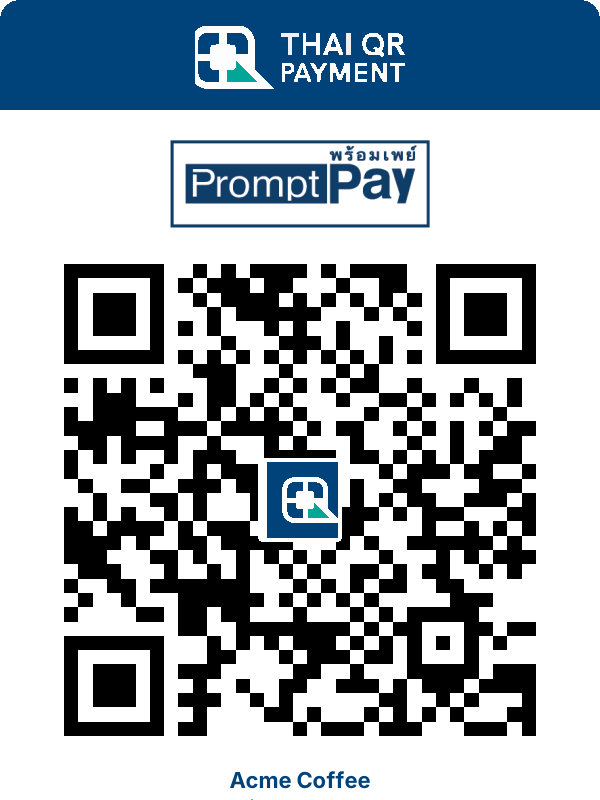
หัวข้อที่มีชื่อว่า “Card (default)”thai-qr-payment 0812345678 --amount 50 --caption --merchant "Acme Coffee" -o qr.svgการ์ด SVG เต็มรูปแบบ พร้อม header ของ Thai QR Payment + PromptPay ชื่อร้านค้า และป้ายแสดงยอดเงิน
thai-qr-payment 0812345678 --amount 50 --format matrix --size 512 -o qr.svgเฉพาะ QR matrix ในรูปแบบ SVG สี่เหลี่ยมจัตุรัส ผู้เรียกควบคุมขนาดได้เอง
Payload
หัวข้อที่มีชื่อว่า “Payload”thai-qr-payment 0812345678 --amount 50 --format payload# 00020101021229370016A00000067701011101130066812345678530376454065000.005802TH63041234สตริง wire ดิบตามมาตรฐาน EMVCo เหมาะสำหรับ pipe ต่อไปยังเครื่องมืออื่น
| Flag | Short | Notes |
|---|---|---|
--recipient <id> | -r | phone, nationalId, eWallet |
--amount <thb> | -a | ละไว้สำหรับ QR แบบ static |
--satang | — | กำหนดให้มอง --amount เป็นจำนวนเต็มหน่วยสตางค์ |
--type <kind> | — | mobile / nationalId / eWallet — override การตรวจจับอัตโนมัติ |
--ecc <level> | — | L / M / Q / H (default M) |
--format <kind> | -f | card (default) / matrix / payload |
--theme <kind> | — | color (default) / silhouette |
--caption | — | แสดงข้อความใต้ QR (โหมด card, ปิดไว้เป็นค่าเริ่มต้น) |
--merchant <name> | -m | ชื่อร้านในข้อความใต้ QR — ต้องเปิด --caption |
--size <px> | — | ขนาด output ของโหมด matrix |
--output <path> | -o | เขียนลงไฟล์ (default คือ stdout) |
--help | -h | แสดงข้อความช่วยเหลือ |
--version | -v | แสดงเวอร์ชันของ CLI |
ตัวอย่าง
หัวข้อที่มีชื่อว่า “ตัวอย่าง”# Dynamic 50 THB card written to filethai-qr-payment 0812345678 --amount 50 --caption --merchant "Acme" -o qr.svg
# Bare 512 px QR matrix with high error correctionthai-qr-payment 0812345678 --amount 50 --format matrix --size 512 --ecc H -o qr.svg
# Print just the payload (for piping)thai-qr-payment 0812345678 --amount 50 --format payload | tee payload.txt
# Pay 50.50 from satangthai-qr-payment 0812345678 --amount 5050 --satang -o qr.svg
# Silhouette theme (monochrome brand artwork)thai-qr-payment 0812345678 --amount 50 --theme silhouette -o qr.svg
# National ID recipientthai-qr-payment 1234567890123 --type nationalId --amount 100 -o qr.svg
# e-Wallet recipientthai-qr-payment 123456789012345 --type eWallet --amount 200 -o qr.svg